
If your dispensary runs a custom online store built on Dutchie Plus, it is going to stop working. Dutchie is discontinuing Plus, the developer and API layer behind those custom storefronts, and as of the writing of this article has said support runs through the end of 2026. Dutchie is pointing customers to a successor, Dutchie E-Commerce Pro, but the move, and the deadline, are yours to manage.
Plus does more than power your storefront. If your custom build indexed product pages on your own domain, those Google rankings are at risk too. Any third-party tool wired to Dutchie specifically through the Plus API also stops working when the API goes, dropping out of your stack until you move it onto a supported path. What is affected depends on how each piece connects, so check before you assume it carries over to Pro.
This guide covers what is changing, who is affected, your three options, how to migrate without downtime, and how to turn a forced change into an upgrade.
In This Post
- What's Changing with Dutchie Plus
- A Chance to Rethink Your Stack
- Your Three Options After the Dutchie Plus Sunset
- Why Operators Are Consolidating onto Meadow
- Your Dutchie Plus Migration Checklist
- Don't Wait for the Deadline
- Common Questions
What's Changing with Dutchie Plus
Dutchie Plus is the developer and API layer some operators use to build a custom online ordering experience on top of Dutchie, including headless storefronts, custom menus, and API integrations. As Dutchie winds it down, the dispensaries hit hardest are the ones running those custom builds. If that is you, you will need to migrate your online ordering before the cutoff, and the longer you wait, the less choice you have about timing.
If your storefront was custom-built on Plus, here is what actually stops working when the API goes:
- Your custom storefront stops working. It pulls live product data from the Plus API, so when that stops, pages error out or freeze on an out-of-date menu.
- Your product pages can drop out of Google. Custom product URLs on your own site turn into dead links, and the rankings built on them go with them.
- Your rich results go stale. The structured data behind those enhanced Google listings needs a live product feed to stay valid.
Integrations change too. Dutchie Plus let developers build custom storefronts and connect third-party tools directly through its API. Dutchie E-Commerce Pro replaces that open API with a managed model, where outside functionality comes through vetted certified-partner plug-ins rather than direct API access. If you run a custom storefront, or any third-party tool for marketing, loyalty, reviews, or analytics that connects through the Plus API, confirm its status on Pro with Dutchie or the partner before you choose your path. Audit every integration now, not after the cutoff.

As of the writing of this article, Dutchie has communicated that support for the legacy Dutchie Plus product runs through the end of 2026. Confirm the exact dates and what applies to your specific setup with your Dutchie account team, since timelines can change.
Not sure whether this applies to you? Signs you are on a custom Plus build: your menu lives on your own domain, your product pages show up in Google, or a developer or agency built your storefront. If your menu is the standard Dutchie embed and its product links point to dutchie.com, you are on the standard product, which is largely unaffected. Either way, confirm how your store is built before you assume you are in the clear.
A Chance to Rethink Your Stack
A forced migration is a chore. It is also a rare, clean moment to ask whether your eCommerce and your POS should keep living in two systems at all.
Most dispensaries run a stack of vendors that do not quite talk to each other: POS in one place, online menu in another, compliance bolted on, and support split across both. Every sunset, outage, or price increase is a reminder of how fragile that setup is. Operators who consolidate onto one platform describe the relief.
The Green Cross switched to Meadow over a year ago and we haven't looked back. We power our sales floor, online menus, delivery, inventory, and purchasing all through Meadow's efficient platform.
When your menu, register, and compliance share one inventory, an entire category of problems disappears: overselling, mismatched menus, and manual reconciliation.
Your Three Options After the Dutchie Plus Sunset
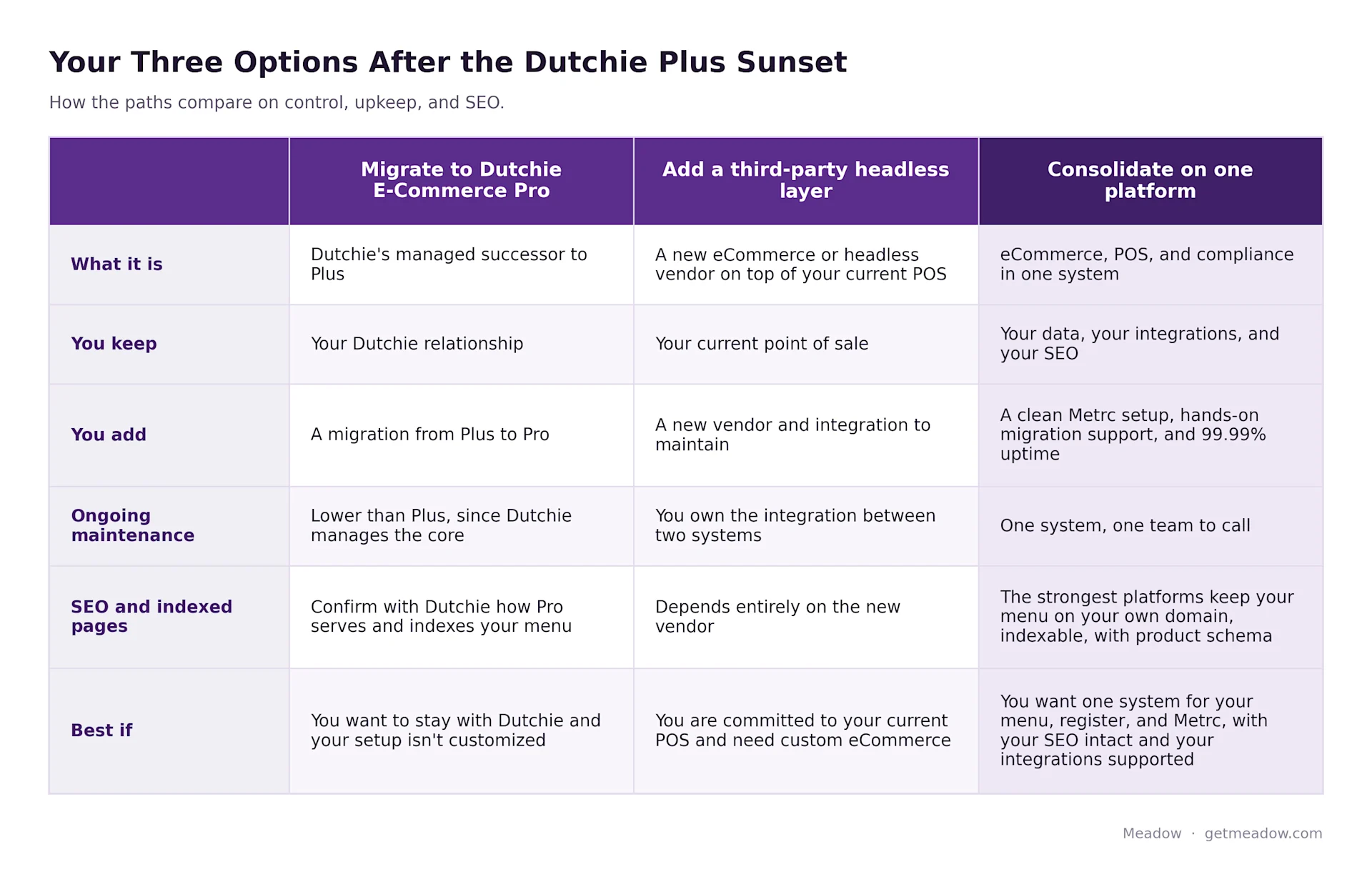
You have three real paths once Plus is retired. The right one depends on how attached you are to your current systems and how much you want to maintain going forward.
- Migrate to Dutchie E-Commerce Pro. This is Dutchie's managed successor to Plus. Dutchie describes it as a "managed core plus extensions" model that it runs and maintains, which means less upkeep than a fully custom Plus build. As of the writing of this article, Dutchie has said a migration path from Plus to Pro exists. It is worth noting that Dutchie does not position Pro as a one-to-one replacement for every custom headless build, so deeply customized frontends may need to be rethought rather than moved over as is.
- Replace Plus with another headless or eCommerce layer on your current POS. This keeps your current point of sale but adds a new vendor and a new integration to maintain. It can be fast on paper, and it leaves you with a multi-system stack and the same fragility you have now.
- Consolidate eCommerce, POS, and compliance onto one platform. Your menu, register, inventory, and compliance run on one source of truth, so a sale on the floor and an order placed online hit the same numbers instantly. Fewer vendors, one bill, and your data stays yours.
Here is what tips the math for a lot of operators: you are migrating either way. Whatever path you pick, you are testing a new checkout, moving product data, and retraining your staff on something. That cost is on the table no matter what, which makes "more change up front" a smaller differentiator than it first looks. The better question is what you want on the other side of a migration you are already doing.
Confirm the specifics of any path with each vendor before you commit. Here is how the three compare at a glance:
Weighing systems more closely? Compare them in our guide to choosing a cannabis dispensary POS system.
Why Operators Are Consolidating onto Meadow
For operators who decide this is the moment to stop patching, Meadow is a common landing spot. Here is what consolidation onto one platform actually gets you:
- eCommerce, POS, and compliance in one system, so your online menu, register, and Metrc share the same inventory in real time.
- Your menu keeps its SEO. Menu Pro serves crawlable, indexable product pages on your own domain, with product, category, and review schema and an auto-generated sitemap. Consolidating does not mean trading away the rankings you built. See how Meadow's SEO tools work →
- No lock-in. Your store and your customer data stay yours.
- One flat monthly fee, with no per-transaction fees.
- A hands-on migration that gets most operators live in days, not months.
- Reliability that holds: 99.99% uptime since 2014, including 100% uptime every 4/20.
💡 How Meadow handles this: Meadow's eCommerce menu (Menu Pro) shares one real-time inventory with your point of sale and Metrc, so your online menu and your register never drift apart. See how Meadow's cannabis eCommerce works →
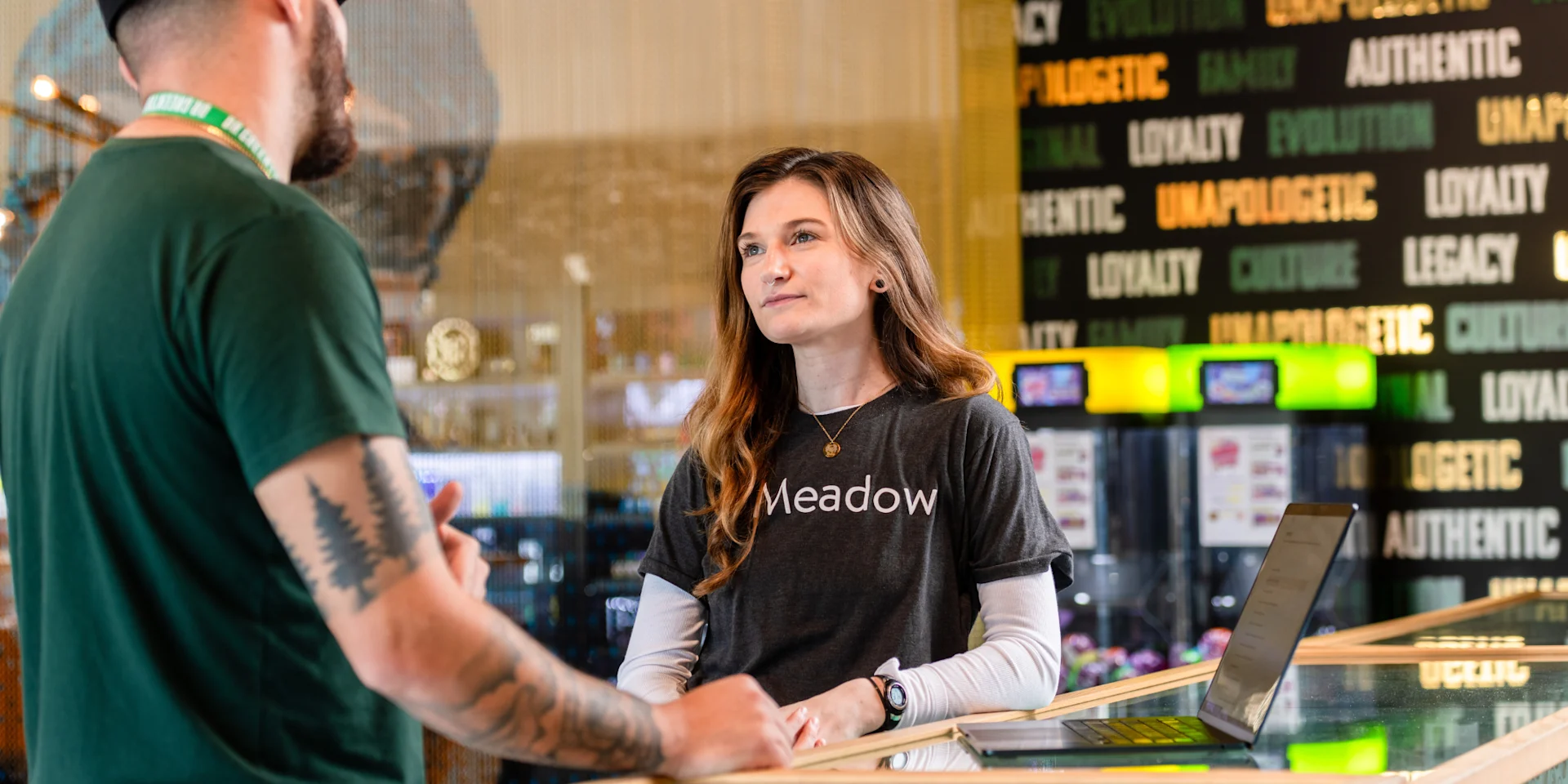
Operators who consolidate rarely look back. One operator who tried other systems before settling on Meadow summed up the lesson.
We spent a great deal of time and money looking for a 'better' point of sale system and what we learned was: even if a POS system offers many bells and whistles and promises you the world, it does not outweigh the importance of functionality and competent customer service.
Your Dutchie Plus Migration Checklist
Whichever path you choose, work the migration like a project instead of an emergency:
- Confirm whether your setup relies on Dutchie Plus (custom menu, headless, or API), or the standard embedded menu.
- Find the official end-of-support date for your account and work backward from it, aiming to finish at least 60 to 90 days early so you have room to test the new setup and let rankings settle. As of the writing of this article, Dutchie has said support runs through the end of 2026.
- Decide among your three options: Dutchie E-Commerce Pro, a third-party headless layer, or consolidating your stack.
- Shortlist platforms and compare on uptime, total cost, support, and how much you will maintain, not only features.
- Confirm the migration plan: data, Metrc continuity, who does the work, and the timeline.
- Cut over during a slow window with support on standby.
💡 How Meadow handles this: Meadow runs the switch for you, with a full Metrc cleanup, an overnight cutover, and go-live support, so most operators move in days without downtime. See the zero-downtime migration playbook →
Don't Wait for the Deadline
Migrations are calm when you pick the date and painful when the calendar picks it for you. If Plus powers your storefront, start scoping your move now, while you can still choose the timing and are not competing with every other Plus user for migration slots. The sooner you decide, the more leverage you have on price, timeline, and support.
Common Questions
Is Dutchie Plus going away?
Yes. As of the writing of this article, Dutchie has said support for the legacy Dutchie Plus product runs through the end of 2026 and points customers to its successor, Dutchie E-Commerce Pro. Dispensaries using Plus for custom or headless eCommerce should plan a migration before the cutoff. Confirm the specifics for your account with Dutchie.
What are my options when Dutchie Plus sunsets?
You have three. Migrate to Dutchie's successor, Dutchie E-Commerce Pro; replace Plus with another eCommerce or headless layer on your current POS; or consolidate eCommerce, POS, and compliance onto one all-in-one platform.
What is the difference between Dutchie Plus and Dutchie Pro?
Dutchie Plus is the legacy, API-first, fully headless toolkit that Dutchie is winding down. Dutchie E-Commerce Pro is its managed successor, built on a managed-core-plus-extensions model that Dutchie maintains, which lowers upkeep but is not positioned as a one-to-one replacement for every custom Plus build. As of the writing of this article, Dutchie has said a migration path from Plus to Pro exists.
How long does it take to move off Dutchie Plus?
With hands-on migration support, a switch usually takes days, not months. Confirm the timeline and data handling with your new provider. Our dispensary POS migration playbook walks through a zero-downtime cutover step by step.
Will I lose my online menu or customer data? Not with a proper migration. Your products, menu, and customer data move to the new platform. Confirm data handling before you cut over.
Turn a Forced Migration Into an Upgrade
If the Dutchie Plus sunset has you rethinking your stack, this is a clean moment to put eCommerce, POS, and compliance on one system. Meadow has built cannabis retail software since 2014 as Y Combinator's first cannabis startup, and operators switch in days, not months, with hands-on migration support.
More Resources for Dispensaries
- The Complete Guide to Choosing a Cannabis Dispensary POS System
- How to Switch Dispensary POS Without Losing a Day of Sales
- How to Build a Seamless Cannabis Ecommerce Experience
- Why Integrated Cannabis POS Software Is Essential for Compliance